
The United States Adopted Names Council
Web Application for USAN
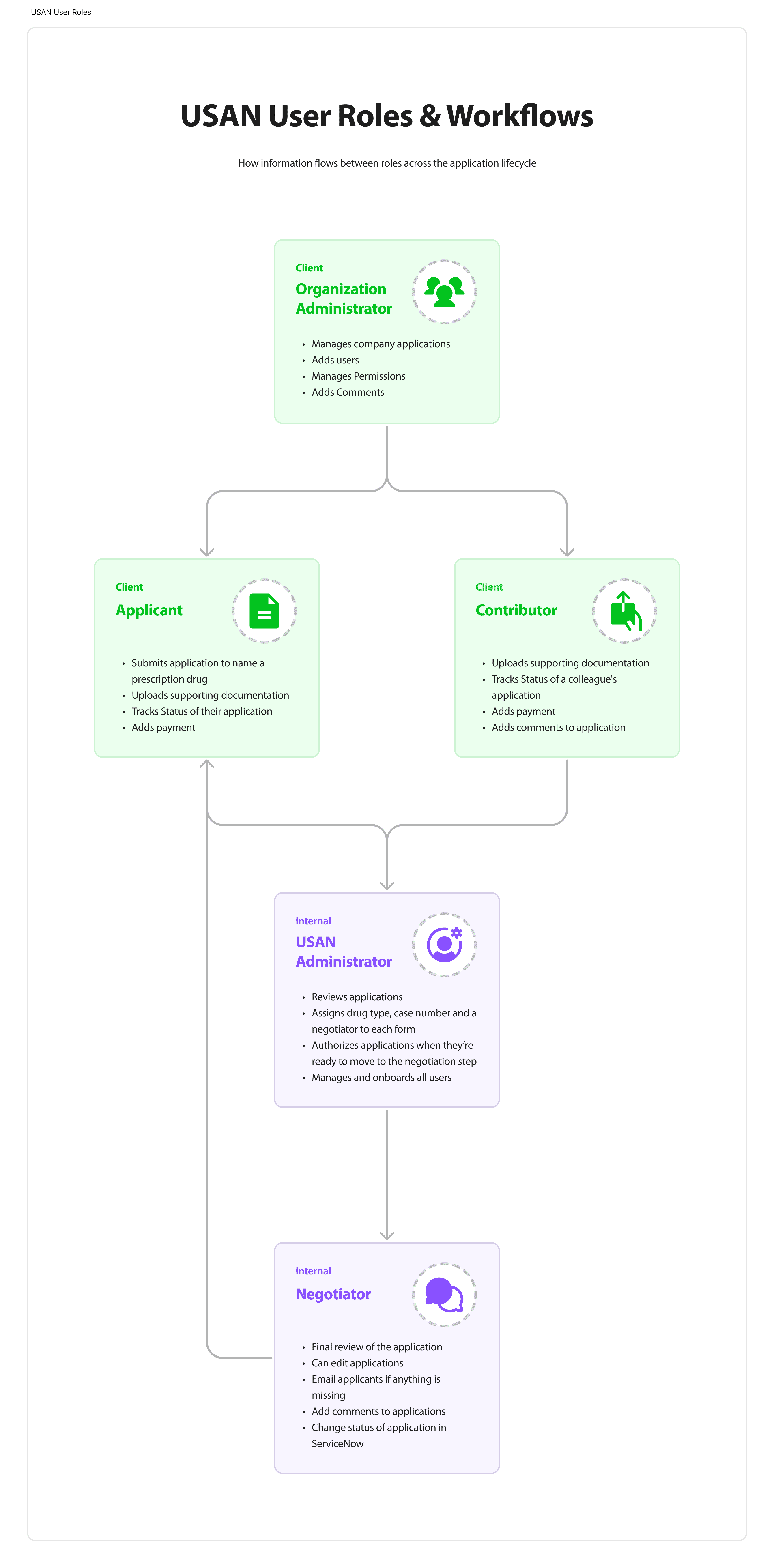
USAN, a subsidiary of the AMA, approves prescription drug names in the United States. Before this project, applicants completed six different forms in Word, tracked progress in Excel, and communicated with staff through Outlook. The process was manual, error-prone, and exhausting for the small team managing it. The goal of this project was to consolidate everything into a single web application that five distinct user roles could intuitively navigate.
Team
Product Manager: A. Patel, P. Bandaru; Developers: J. Contreas; Key Stakeholders: B. Wells, S. Pritchard; Project Manager: A. Tamalonis
Scope
Multi-role application design, complex form workflows, admin dashboard design, negotiator inbox design, user management and permissions, document upload systems, Material UI integration
role
Sole Product Designer. Owned UX, UI, information architecture, and data visualization.
Duration
5 weeks
Audience
Prescription drug company employees, USAN staff, and marketing agencies
Software
Microsoft Excel, Figma, Figjam
The Challenge
The problem was more than just replacing paperwork. USAN needed a single web application that could handle five distinct user roles, each with different permissions, actions, and needs. Six Word forms, several Excel spreadsheets, and too many to count Outlook threads had to come together become one coherent system. The system needed to let applicants, organization admins, contributors, general admins, and negotiators do their jobs without stepping over each other.
The Approach
I audited Google Workspace apps for navigation patterns and interaction models that would feel familiar to users already working in enterprise tools. I then created mid-fidelity wireframes to map how screens connected and how the layout would support the workflows of the five different roles. From there, I designed high-fidelity screens for each workflow: applicant submissions, user management on our end and on the end of the pharmaceutical company, review and authorization of submitted forms, and negotiator inbox and approval. I also presented four branding color options to stakeholders, balancing USAN's existing identity with AMA design system constraints.

Overview of the redesigned application workflow.
Good Navigation
To help users get around the application, we instituted core material Navigation components such as a left-sided menu, tabs, accordions and visible CTA buttons. Each screen also contained a basic and minimal top navigation and a footer that contained links to legal notices.
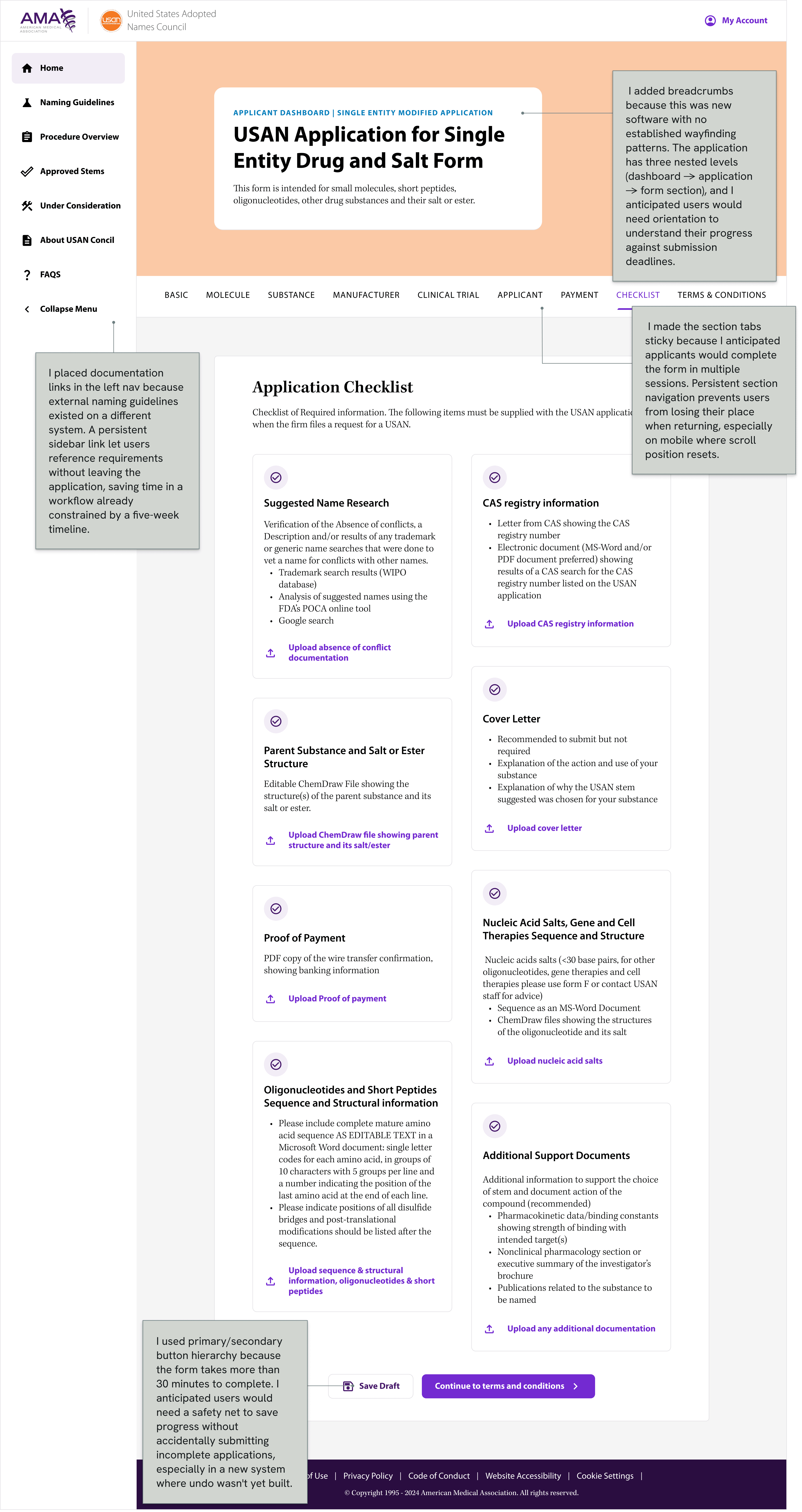
Application screen showing the naming request flow.
Iconography that speaks
I used iconography strategically to reduce cognitive load across the application. In forms, icons made sections scannable and helped users quickly identify document types. In the sidebar menu, icons reduced the burden of reading labels for navigation. In buttons, icons aligned with Material UI conventions while reinforcing action clarity.
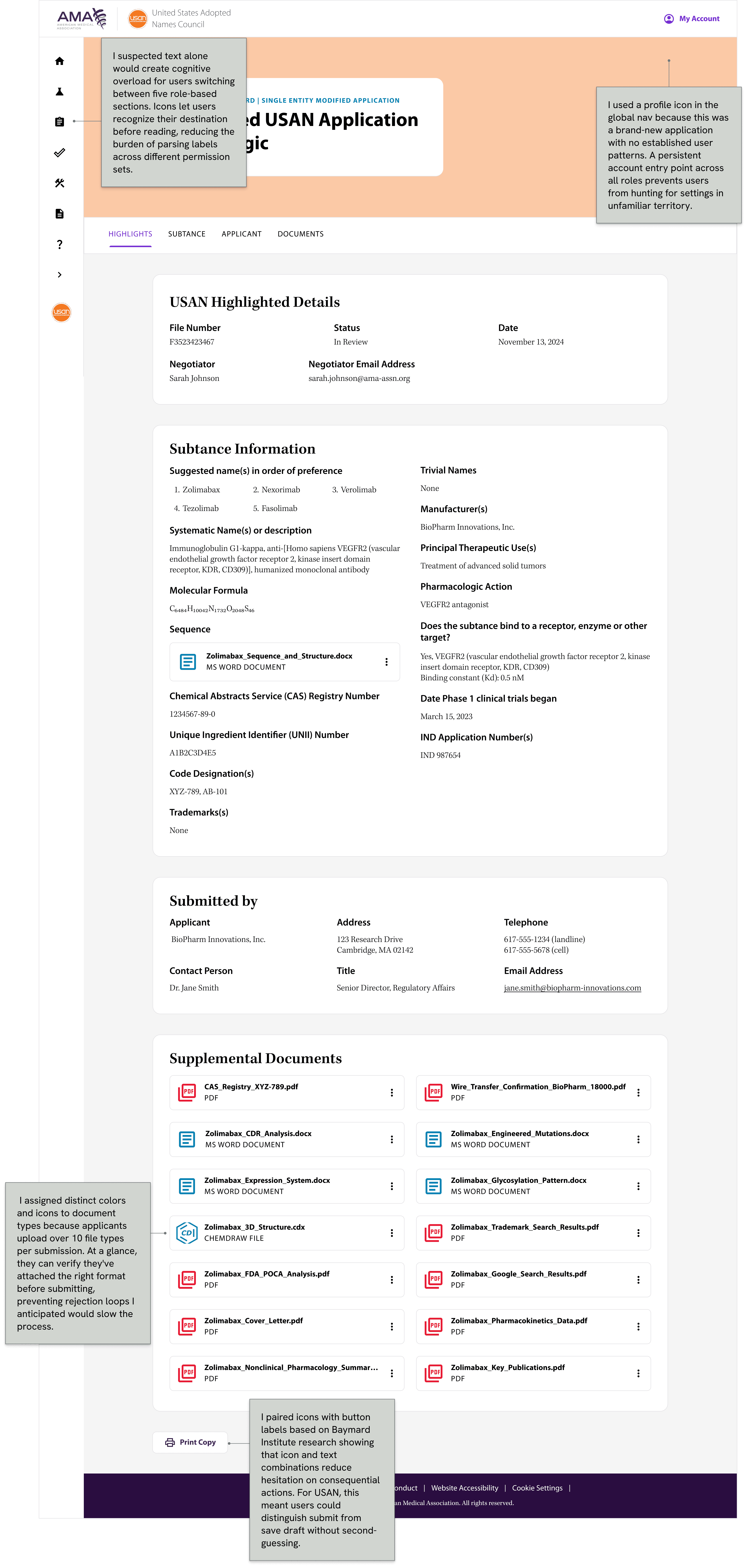
Detailed application view for processing requests.
Complex Forms
The application submission workflow leverages Material UI’s form components, enhanced with AMA-specific styling. The three most important features of the product are:
(1) A step dedicated to uploading documents that acts like a checklist. (See the good navigation section for wireframes.)
(2) Accesible error states and a lot of help text for complicated form field entries, such as fields where the user has to input chemical formulas.
(3) Conditional logic that shows questions only after the user gives certain answers to previous questions in order to not overload the user with unecessary steps.
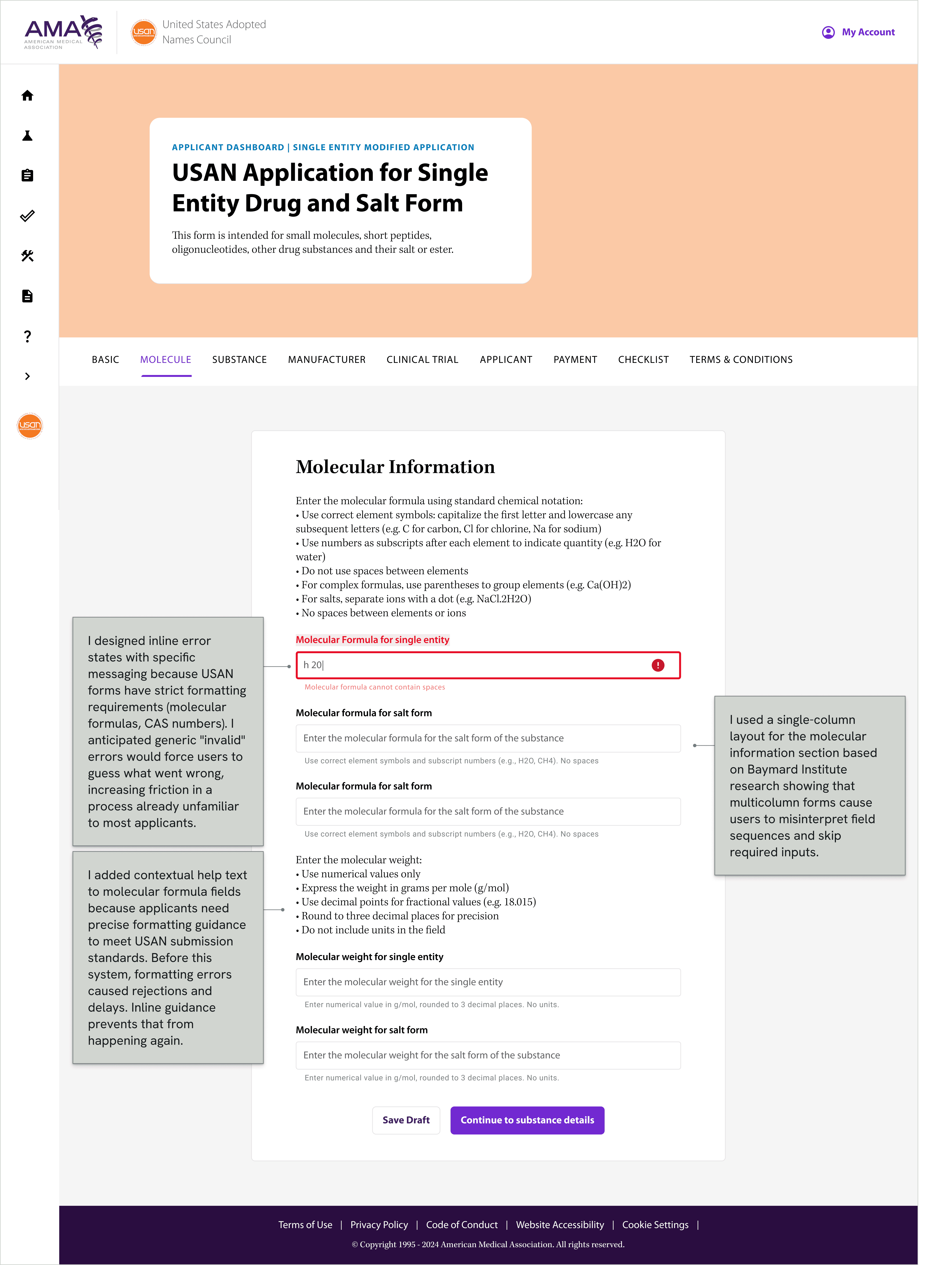
Request detail screen for reviewing application information.

Supporting request screen from the USAN application.
The Lesson
I designed two charts in Figma to show the key stakeholder his team's progress and revenue throughout the year. The developers could not build this dashboard for the MVP due to ServiceNow limitations. This was a good reminder that I should always confirm technical constraints before investing design effort in complex data visualizations or just in general.
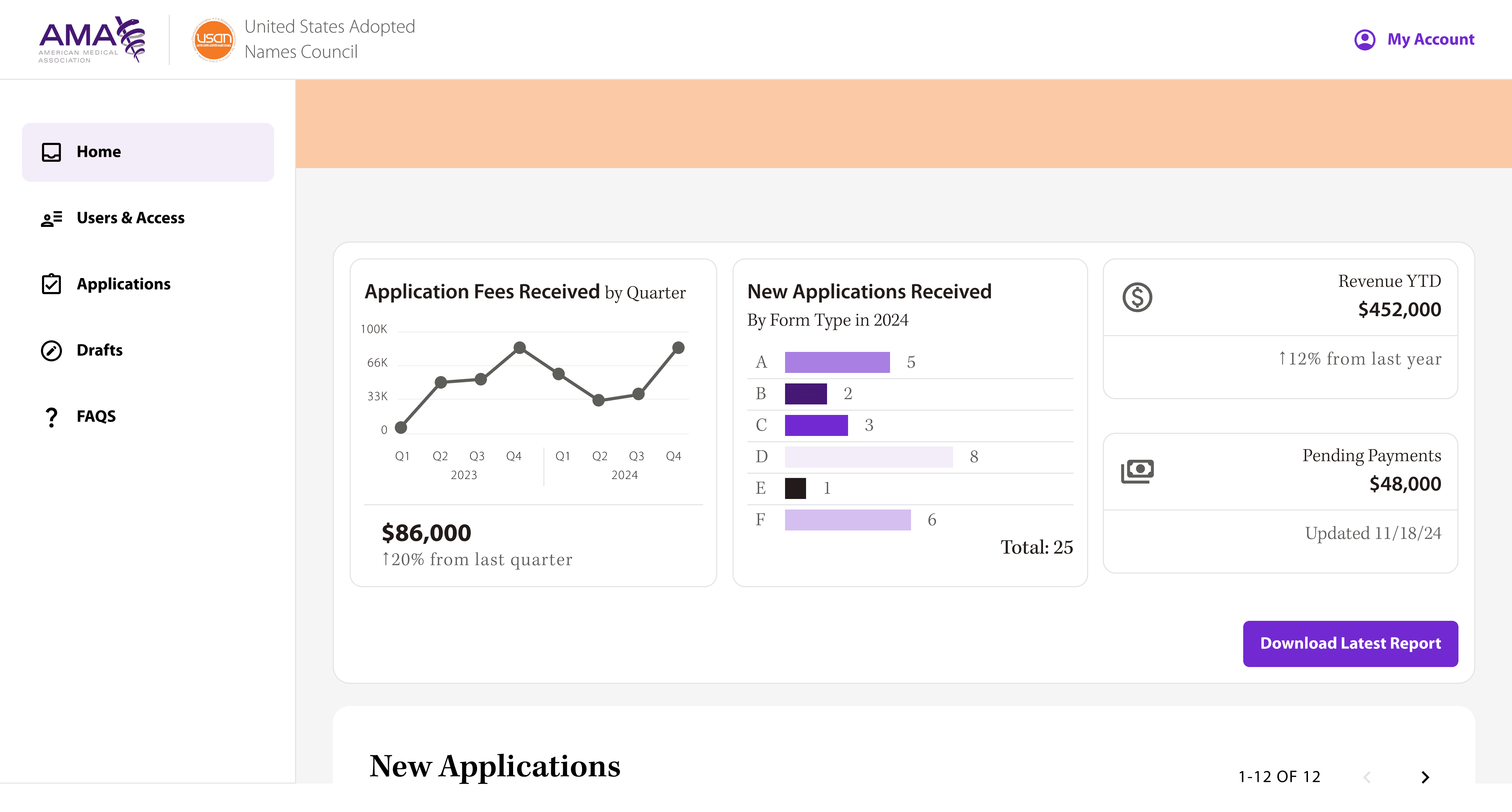
Final interface example from the USAN workflow.
The Impact
Processing time for naming requests dropped from 14 days to 10 days. Stakeholders reported the new system eliminated the manual tracking burden and reduced errors in submission handoffs.
B. Wells
Reflection
Next time I would conduct card sorting with users to validate navigation hierarchy, and coordinate with market research to build usability testing into the timeline rather than adding it after launch.